 LYNX SHARE
Open the song
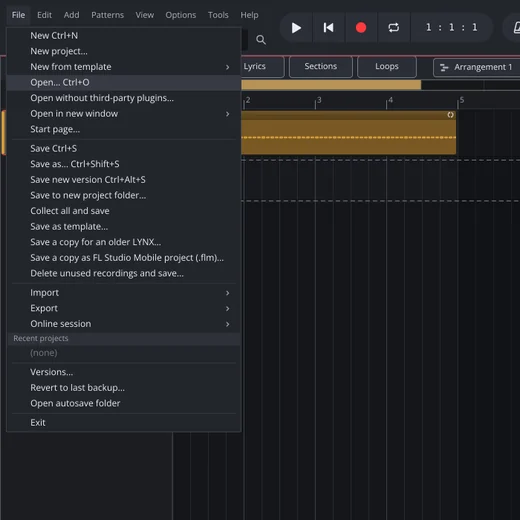
- Copy the song to your computer: an FL Studio Mobile
.flm, a BandLab project downloaded as.blx, or a GarageBand.band. - Choose
File › Open...(Ctrl+O) and pick it, or drop it on the window.
What you get

- The song opens in the Simple layout, one track per instrument, with the tempo, the patterns or regions and the mix.
- Press Play to hear it.
- Click a track to edit it in the dock under the timeline.

What could not come over

- When something had to change, a short report opens with the song. Here, FL Studio Mobile's MiniSynth plays one of LYNX SHARE's synth sounds.
Help › Last project import reportshows that report again.- Instruments the phone app keeps to itself play on LYNX SHARE's built-in sounds.
Back to the phone
File › Save a copy as FL Studio Mobile project (.flm)...writes a.flmyou can open in FL Studio Mobile.
See also Coming from BandLab, FL Studio Mobile or GarageBand and File formats.