LYNX SHARE

Why LYNX

What producers keep complaining about in FL Studio, Ableton Live, FL Studio Mobile and BandLab, what LYNX SHARE does about it, and six things that set it apart. Everything here is in the current release.

Complaints LYNX SHARE answers

These come up again and again on Reddit, the Image-Line and Ableton forums, KVR and app-store reviews. Each answer says where to find it in LYNX SHARE.

FL StudioAbleton LiveMost DAWs

One plugin crashes and takes the whole project with it.

Turn on Options › General settings › Run plugins in a separate process, and a plugin that crashes only goes silent. Without it, a plugin that crashes while it plays is switched off and LYNX SHARE keeps running. Either way the plugin reloads from its window, without reopening the project. After a crash LYNX SHARE offers to run that plugin in a separate process from then on.

FL Studio MobileBandLabMost DAWs

A crash, and the last hour of work is gone.

A backup is saved every two minutes and the ten newest are kept for each project. After a crash, the next start offers the newest one, and File › Versions... lists every saved version and backup. Projects are files on your own disk, not in an online account.

FL StudioAbleton LiveFL Studio MobileBandLab

FL Studio and Live cannot open each other's projects.

File › Open reads FL Studio projects (.flp), Live 11 and 12 sets (.als) and FL Studio Mobile projects (.flm). File › Export writes .flp or .als, and a report lists what was approximated. A folder of stems and MIDI exported from BandLab comes into the Simple workflow in one drop.

Ableton LiveFL StudioBandLab

The feature I need is in a higher edition or behind a membership.

There is one edition and it is free. Audio recording, stem extraction, Convert to MIDI, the Clip-launch and Simple workflows and every built-in instrument and effect come in the same download.

FL StudioAbleton LiveBandLab

Trials that cannot reopen projects, activation limits, logins and ads.

There is nothing to activate or sign in to and there are no ads. Saving, reopening and the number of computers you install it on have no limit.

FL StudioAbleton Live

No Linux version, and FL Studio stopped running under Wine.

LYNX SHARE runs natively on Linux (AppImage and tar.gz) with PipeWire, JACK and ALSA, and loads VST3, CLAP, LV2 and VST2 plugins there. The same project opens on Windows and macOS.

FL StudioBandLab

AI features that send my project to someone's server.

Convert to MIDI and Extract stems from sample run on your own computer; stem extraction downloads its model once, after asking. LYNX SHARE has no account. It goes online only for the update check, which you can turn off, a live session you start, or a crash report you agreed to send.

Most DAWs

One broken plugin hangs the plugin scan.

Every plugin file is scanned in its own process. A file that crashes is marked as failed and skipped, a plugin that is only slow to scan is waited for, and the Plugin manager can try a failed one again.

FL StudioAbleton Live

Sidechaining takes five steps in the mixer.

Effects with a side input have a "Sidechain from" list of the mixer inserts: pick one and the route is made. Third-party plugins with a second input get the same list.

FL Studio

Moving a mixer track rewires the sends and sidechains.

Moving, inserting or deleting mixer tracks keeps sends, sidechains, automation and MIDI links on the track they belong to.

FL StudioMost DAWs

Heavy instruments use up the computer, and bouncing them loses the way back.

Right-click a channel in the Channel rack and choose Freeze: it plays audio rendered from it and its instrument is unloaded, third-party plugins included. Unfreeze brings back exactly what was there, and Tools › Plugin performance monitor shows which plugin uses the time.

FL StudioMost DAWs

Too many windows before the first song.

View › Layout style › Simple workflow shows one window with the tracks and the timeline, in the style of BandLab and FL Studio Mobile, and a first-song tour goes through it step by step. The setup wizard offers it at the first start, and the full windows stay one click away.

Every complaint and what LYNX SHARE does about it

Online sessions

Work on one project with up to three other people, live or by sending files.

Send a project. File › Online session › Send project writes a .lynxpack file with the project, its samples and recordings, and an audio render of every part that uses a third-party plugin, so your friend hears it without owning your plugins. They add their part on their own mixer inserts and Playlist tracks and send it back, and you merge it in one undo step. This needs no network, account or server.

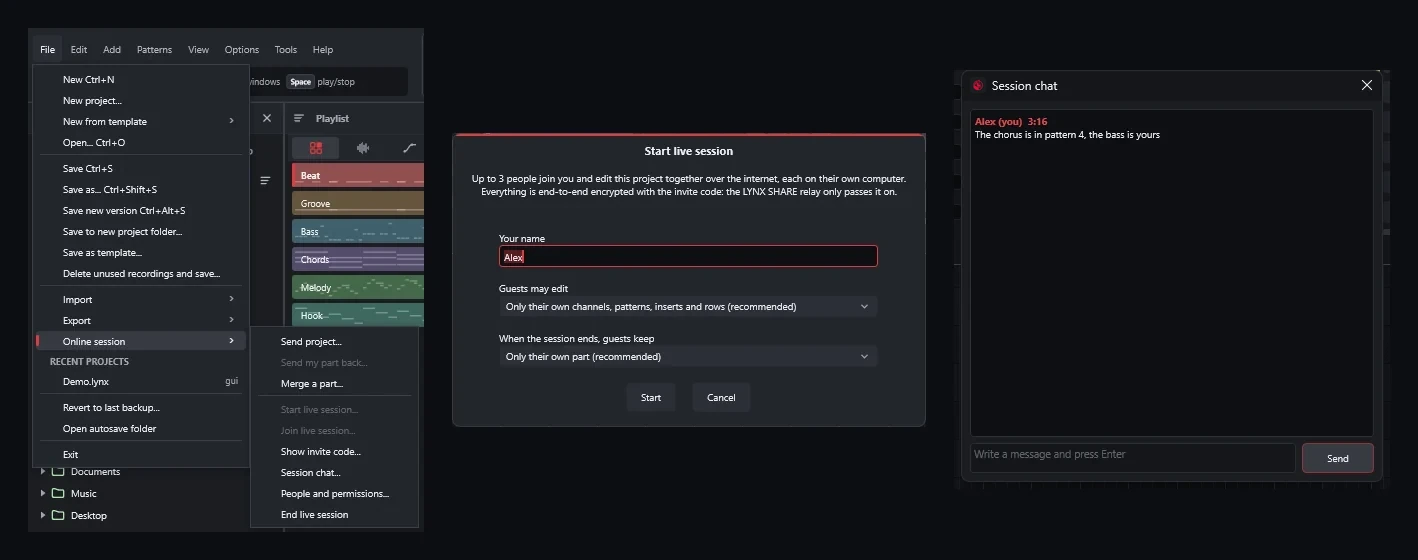
Live session. The host starts a session and shares an invite code. Guests paste it, the host lets them in, and every edit reaches everyone. There is a session chat, guests can follow the host's transport, and the host decides what each person may edit. A part that uses a plugin someone lacks is rendered by the person who has it and streamed to the others as audio.

Shared plugins. In a live session the host can share plugins with the guests. A shared plugin runs on the host's computer, and a guest uses it in the project and changes its settings from their own window without owning it.

Limits

  • Four people at most, the host included. Everyone should run the same LYNX SHARE version.
  • Live sessions go through the LYNX SHARE relay, end-to-end encrypted with a key taken from the invite code. The relay sees IP addresses and byte counts, not the content.
  • A rendered part follows clips you move, but not edits to the notes of a plugin you do not have.

Read the guide

  1. HostSend project: one .lynxpack file
  2. FriendOpens it, records a part, sends it back
  3. HostMerge a part: added in the friend's colour
From LYNX SHARE 0.1.25: the Online session menu during a live session, the Start live session window and the session chat.

Opens and writes other DAWs' projects

FL Studio projects and Ableton Live sets open with File › Open and can be written back.

An .flp comes in with its channels, samples, patterns, arrangement, automation and mixer. A Live 11 or 12 set (.als) comes in with its tracks, clips and Session view, which lands in the clip grid. FL Studio Mobile projects (.flm) import the arrangement, samples, drum kits, DW Sampler and DirectWave programs, the Slicer, five of its synths, its effects, its automation and its chord sets. FL Studio Mobile Rack channels in an .flp play on the same engines. The original file is never changed: saving writes a .lynx file.

FormatOpenExportWhat does not convert
.flpYesYesFLEX packs are never opened. On export, LYNX-only instruments and effects are rendered to audio or swapped for the nearest FL plugin, and modulators are left out.
.alsYesYesMany of Live's own effects and instruments become LYNX SHARE's own, Hybrid Reverb, Roar, Grain Delay and Drum Buss among them; the ones with no equivalent are dropped and listed. On export, LYNX SHARE's own instruments and effects, effect-parameter automation and insert-to-insert routes are not written.
.flmYesNoInstruments other than MiniSynth, Transistor Bass, 3x Osc, GMSynth, SuperSaw, DW Sampler, Slicer, DirectWave and the samplers play the built-in synth. Factory sounds play when you point LYNX SHARE at your own copy of FL Studio Mobile's Resources folder.

Read the guide · Every file format

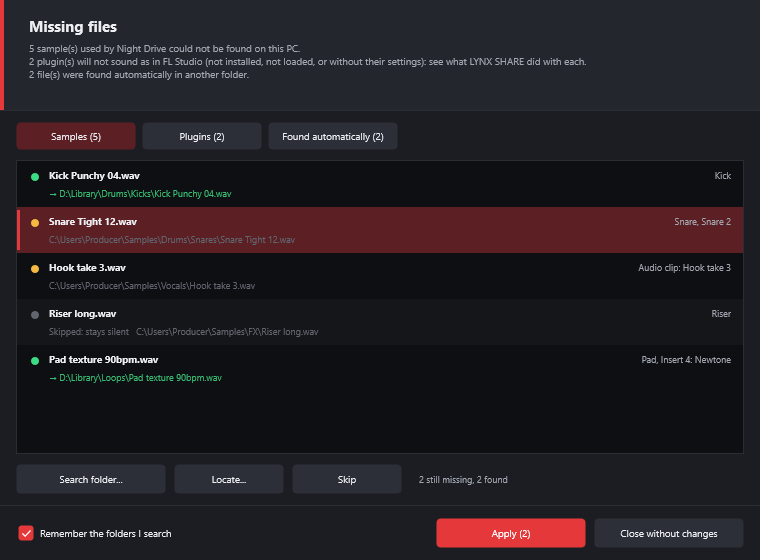
After opening a project, the Missing files window says what could not be found and what LYNX SHARE did about each item.

FL plugins' settings open in LYNX's own engines

A project that uses FL Studio's native plugins plays without FL Studio installed.

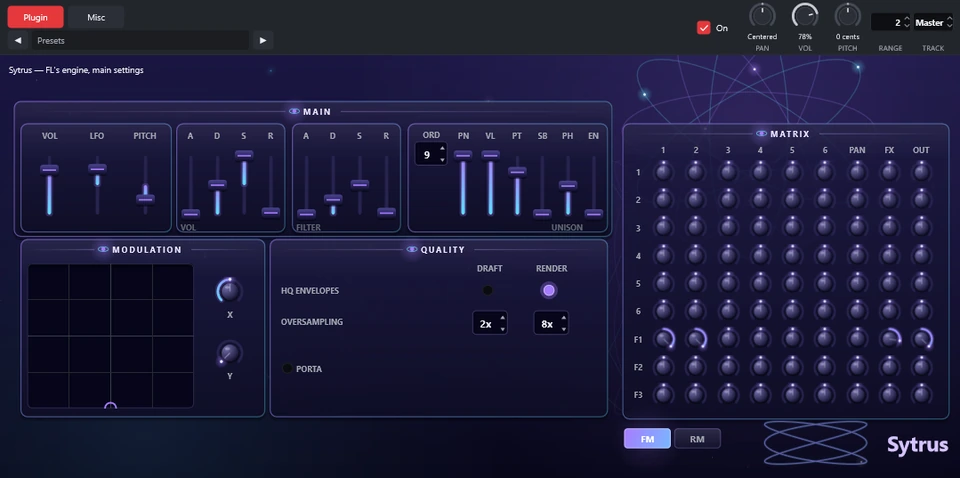
FL Studio's own plugins cannot be loaded by another program. LYNX SHARE has its own engine for most of them, written from scratch, and reads each plugin's saved settings from the .flp or from an .fst preset. A Sytrus channel opens as LYNX SHARE's Sytrus engine with the same patch, a Fruity Limiter slot as its limiter with the same values.

Limits

  • Not every engine sounds exactly like the original. The plugin list gives each one a status from exact to approximate.
  • Some engines need wave data or samples that belong to FL Studio. LYNX SHARE reads those from your own FL Studio installation and ships none of them.
  • FLEX packs are never opened: a FLEX channel plays the built-in synth instead.

Read the guide · Plugins

LYNX SHARE's Sytrus engine: operator matrix, envelopes and modulation pad
LYNX SHARE's own editor for its Sytrus engine.

Three workflows in one program

The FL Studio workflow by default, clip launching in the style of Ableton Live, or one simple window in the style of BandLab and FL Studio Mobile. Switch at any time.

The default is the FL Studio workflow: Channel rack, Piano roll, Playlist and Mixer. View › Layout style › Clip-launch workflow adds a clip grid next to the Playlist, in the style of Ableton Live, where Playlist tracks are columns and scenes are rows. Clips have launch modes, quantisation, legato, loop and follow actions, and a Grid / Both / Song switch chooses what plays.

View › Layout style › Simple workflow mixes BandLab's approachable one-window style with FL Studio Mobile's way of working, and suits a first song: one window with the tracks and the timeline, a New track chooser that adds a voice, an instrument, a sampler or a starter beat in one click, loops, pads and quick recording, a track dock with one-knob effects and a Chord pad, and a Finish dock that saves the song as a file. FL Studio Mobile projects (.flm) open in it. A first-song tour shows the way step by step. The setup wizard offers the three workflows at the first start, and switching later keeps the project as it is.

Limits

  • The Clip-launch and Simple workflows are optional. The FL Studio workflow is unchanged when they are off.
  • It is one program with three workflows, not a copy of another DAW: Live's own devices are not there.

Read the guide

The Clip-launch layout: a clip grid with scenes next to the Playlist
The Clip-launch layout in 0.1.25.

Plugin crash protection

A third-party plugin that crashes does not have to take your project with it.

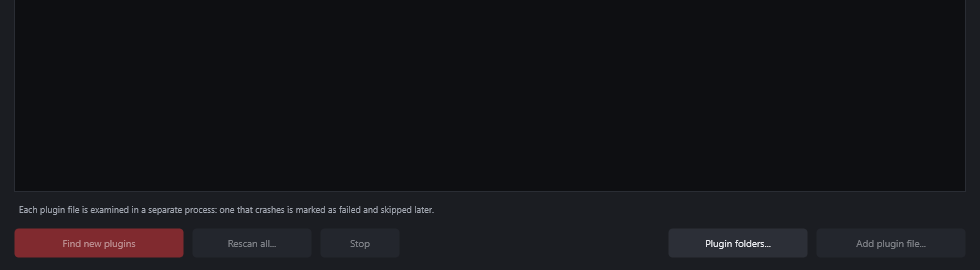
Every plugin file is scanned in a separate process, so a plugin that crashes or hangs during the scan is marked as failed and skipped. With "Run plugins in a separate process" turned on in the general settings, each plugin also runs outside LYNX SHARE while you work: if it crashes, it goes silent, a notice appears and the program keeps running.

On Windows, 32-bit VST2 and VST3 plugins run through a bridge that adds no latency. A plugin that crashes in the bridge stops on its own while LYNX SHARE keeps playing.

Without a separate process, a plugin that crashes while it plays is switched off and LYNX SHARE keeps running, on Windows, macOS and Linux. A plugin that crashes while a project loads is left out, and the project opens with its settings kept.

Limits

  • Running plugins in a separate process is off by default. You can turn it on for everything or for one plugin.
  • A plugin in a separate process, or in the 32-bit bridge, opens its editor in its own window.
  • The 32-bit bridge is Windows only.
  • On Linux and macOS, without a separate process, a crash while a plugin opens its editor, loads a preset or works on its own threads is not caught yet.

Read the guide

The lower part of the Plugin manager in 0.1.25, with its note that each plugin file is examined in a separate process.

Free on Windows, Linux and macOS

No price, no account, no subscription, and the source is public.

LYNX SHARE runs on Windows 10 and 11, on macOS 11 or newer (Apple Silicon and Intel) and on Linux x86_64. The same project file opens on all three. It is licensed under the AGPL-3.0: you can read the code, build it yourself and change it.

It does not ask you to sign in, and it sends nothing over the network unless you ask it to: checking for updates, a live session, or a crash report you agreed to send.

Limits

  • It is an alpha. Expect bugs and keep backups.
  • The Windows build is not code-signed and the macOS build is not notarized yet, so both systems warn the first time you open it.
  • The macOS build is made by CI and has had little testing on real Macs.

Download · Read the guide · GitHub