 LYNX SHARE
Compressor
Compressor with threshold, ratio, attack, release, make-up gain and mix. It has a Classic voicing with a clean or FET law, a Vintage voicing and a switchable limiter.
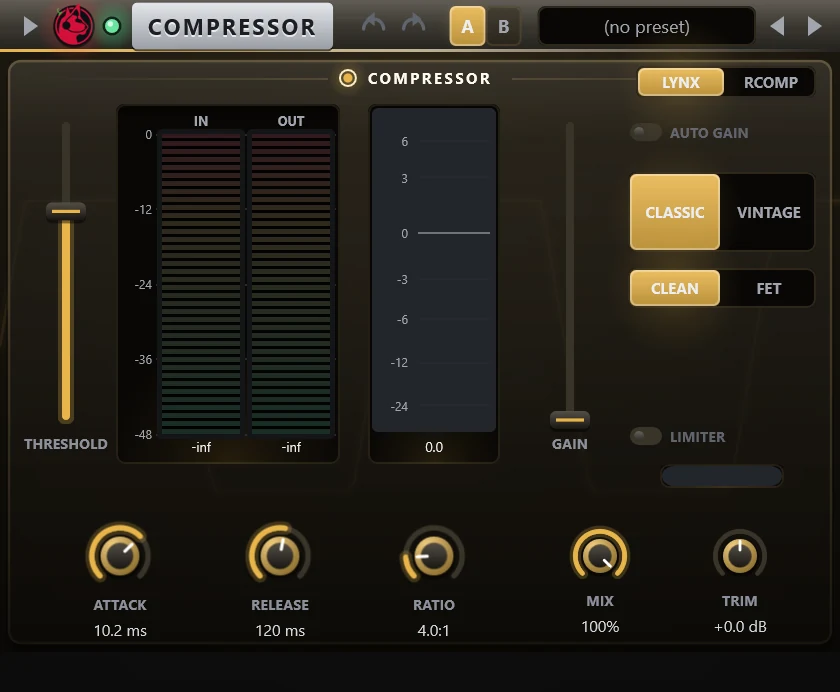
Compressor reduces the level of loud parts of a track. It is added to an insert slot and used to even out vocals, drums and basses. It has a Classic and a Vintage voicing. Classic runs clean or with a FET law that has a soft knee and a release that depends on the programme. The LYNX and RComp switch selects the ranges of the controls.
Controls
| Control | What it does |
|---|---|
| Threshold | Level above which compression starts. |
| Ratio | How strongly signals above the threshold are reduced. |
| Attack | How fast the compressor reacts. |
| Release | How fast it lets go. |
| Gain | Make-up gain. |
| Auto gain | Adds make-up gain automatically. |
| Mix | Dry and wet balance for parallel compression. |
| Trim | Output level trim. |
| Limiter | Switches on an output limiter. |
| Classic / Vintage | Selects the voicing. |
| Clean / FET | Shown with Classic. Clean is the compressor as it was. FET adds a 5 dB knee and a programme-dependent release. Clean is the default. |
| ARC / Manual, Electro / Opto, Warm / Smooth | Shown with Vintage: the release mode, the release curve and the character. |
| Old / Measured | Shown with Vintage: the static curve. Projects saved with the old curve keep it until you switch. |
| LYNX / RComp | Selects the ranges of the ratio, gain, attack and release controls. |
Tips
- Use Mix below 100 percent to blend in the uncompressed signal.
- The In and Out meters show the level before and after, the centre meter shows the gain change.
- FET is off in existing projects, so they sound as before.