 LYNX SHARE
Fruity Delay Bank
A bank of up to eight delay lines with per-line input, filter, feedback, grain and output sections, plus global dry, wet, input and feedback levels.
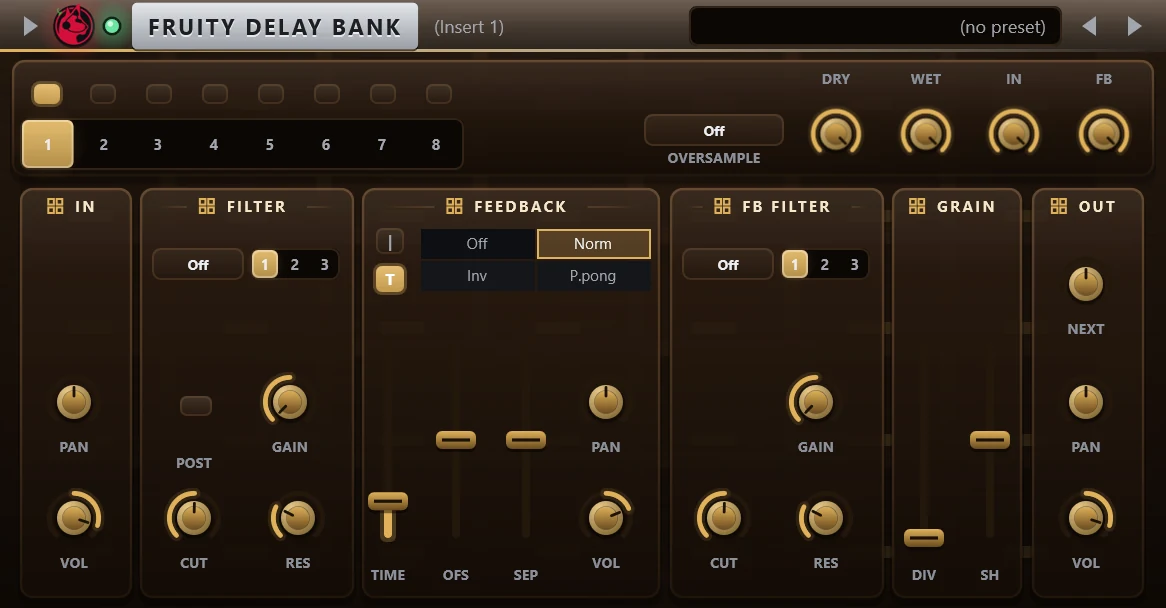
Fruity Delay Bank has eight delay banks. Each bank has an input stage, a filter, a delay line with a feedback path and its own feedback filter, a stepped gain pattern and an output stage, and can send into the next bank. It loads the settings of the FL Studio plugin from an imported .flp project.
Controls
| Control | What it does |
|---|---|
| Bank switches and tabs 1 to 8 | The switches on top turn each bank on. The tabs choose the bank shown. |
| Dry / Wet / In / FB | Global levels: the dry signal, the output of the banks, the input into the banks and the feedback of all banks. |
| Oversample | Off, 2x or 4x. |
| In: Pan, Vol | Pan and level of the signal entering the bank. |
| Filter | Type (off, low pass, band pass, notch, high pass, low shelf, peaking or high shelf), 1 to 3 sections, Gain, Cut and Res. Post places it after the delay instead of before. |
| Feedback: mode | Off for no delay, Norm, Inv for swapped outputs, or P.pong for ping-pong feedback. |
| Feedback: Time and T | Delay time. T syncs it to the tempo. |
| Feedback: Ofs | Time offset between the left and right delay. |
| Feedback: Sep, Pan, Vol | Stereo matrix, pan and level of the feedback path. |
| FB filter | A second filter with the same types, inside the feedback path. |
| Grain: Div, Sh | A stepped gain pattern on the delay. Div is the number of steps per delay time (0 is off) and Sh the shape of the steps. |
| Out: Next | Amount of this bank sent into the next bank. Bank 8 has no Next. |
| Out: Pan, Vol | Pan and level of the bank in the output. |
Tips
- Select a bank with the numbered tabs to edit it. The switches above the tabs show which banks are on.