 LYNX SHARE
Slicex
Slicer and drum sampler with two sample decks. The regions of each deck play from their own keys, with layering, articulator envelopes and LFOs, and a filter per articulator group.
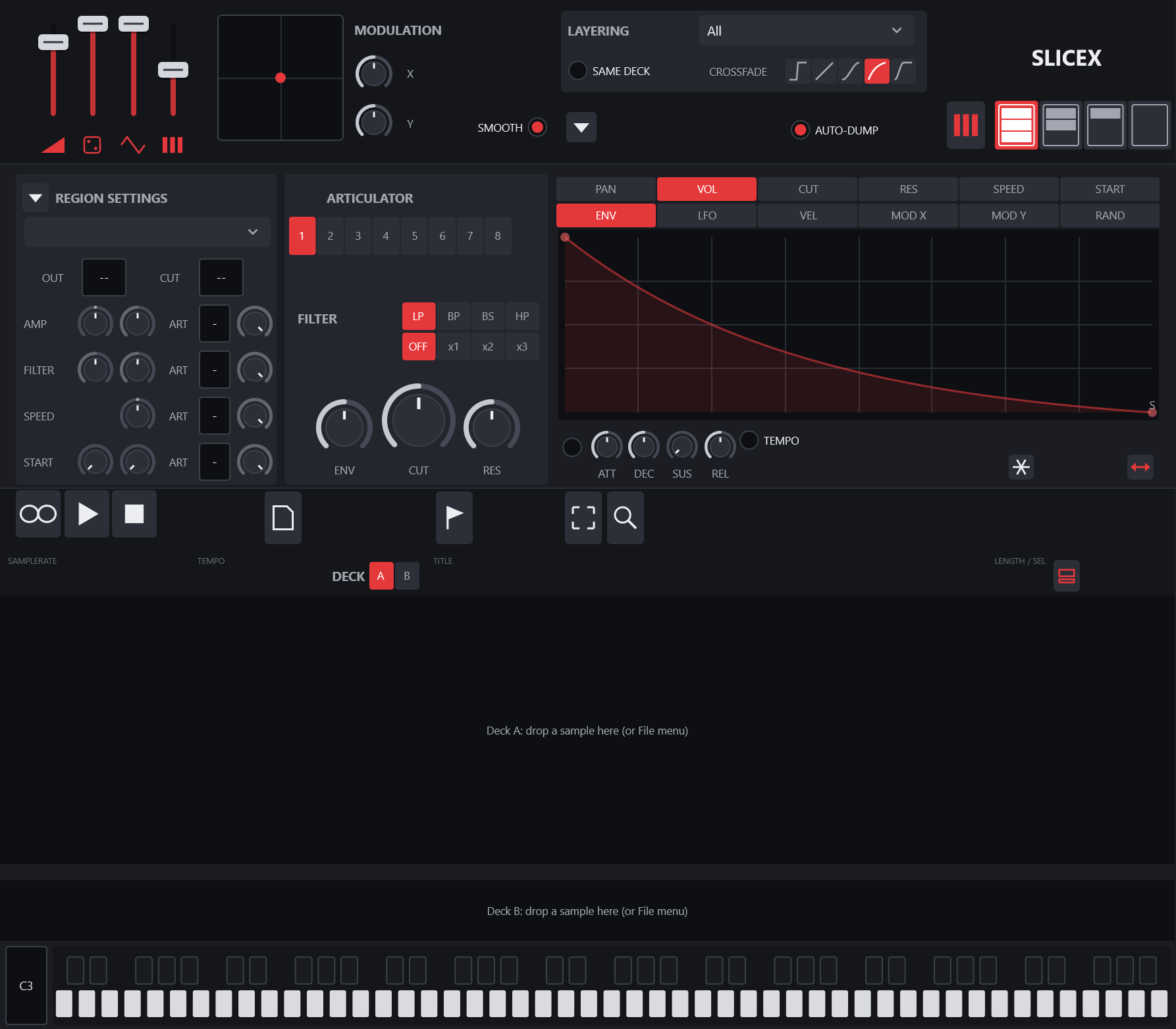
Slicex loads a sample on each of two decks, A and B, cuts it into regions and plays each region from a key. It opens the settings of FL Studio's Slicex from a .flp and writes them back on export. A new instance starts with empty decks and needs no files from an FL installation. A WAV file that brings no regions of its own is sliced on its hits when it loads.
Controls
| Control | What it does |
|---|---|
| Master sliders | Master level, Master randomness level, Master LFO level and Master pitch, minus 1200 to 1200 cents. |
| MODULATION | An X / Y pad with X and Y wheels. SMOOTH smooths the modulation. |
| LAYERING | How regions on the same key play together: All, All (gain-compensated), Velocity-mapped, Modulation X-mapped, Modulation Y-mapped, Random, Cycle or Song time-synced. SAME DECK layers regions of the same deck only. |
| CROSSFADE | The curve between layered regions: none, linear, balanced curve, unbalanced curve or adding. |
| REGION SETTINGS | The current region, its OUT (output track offset) and CUT (cut group), and four rows: AMP (panning and volume), FILTER (cutoff and resonance), SPEED (pitch) and START (delay and sample start). Each row has an ART group number and an amount. |
| ARTICULATOR | Selects one of 8 articulator groups. Its FILTER has a type (LP, BP, BS, HP), a mode (OFF, x1, x2, x3) and ENV, CUT and RES wheels. |
| PAN, VOL, CUT, RES, SPEED, START | The target the curve editor shows. |
| ENV, LFO, VEL, MOD X, MOD Y, RAND | The part of the articulator shown: its envelope, its LFO, or the map from velocity, modulation X, modulation Y or randomness. |
| TEMPO, GLOBAL | TEMPO makes the curve's time follow the tempo. GLOBAL makes the LFO phase run with the song. |
| ATT, DEC, SUS, REL | Scale the envelope's attack, decay and release times and offset its sustain level. |
| SPD, TNS, SKEW, PW | LFO speed, tension, skew and pulse width. |
| Deck tool row | Loop, Play / pause, Stop, the File, Regions, Select and Zoom menus, single or dual deck display, and the current deck, A or B. |
| File | New, Load sample... and Save sample as..., which saves the deck's WAV with its regions. |
| Regions | Add region..., Add marker..., Set loop, Delete, Rename all..., Set all cut groups to... and Freeze all. |
| Keyboard | Plays the keys and shows which have regions. Its menu has Assign current region to this key and Select region assigned to this key. The digit beside it sets the base octave. |
| Options | Sample start covers whole length, Link velocity to volume, Loop half of regions and HQ envelopes. |
Tips
- Drop a sample on a deck to load it. Only a WAV file gets markers from the automatic slicing, because the markers are stored in the deck's WAV.
- A region's menu has Delete, Clone as region, Turn into marker, Rename..., Trigger note and Zoom on.
- Notes with an even colour play deck A and notes with an odd colour play deck B. Colours 14 and 15 play reversed.
- FL's Snap and View menus are not there yet, and the File and Regions menus have only the entries listed above.