 LYNX SHARE
Emphasis
Limiter-style dynamics effect with an emphasis amount, ceiling, envelope and hardness controls, true peak and mid/side modes, oversampling and a level-matching option.
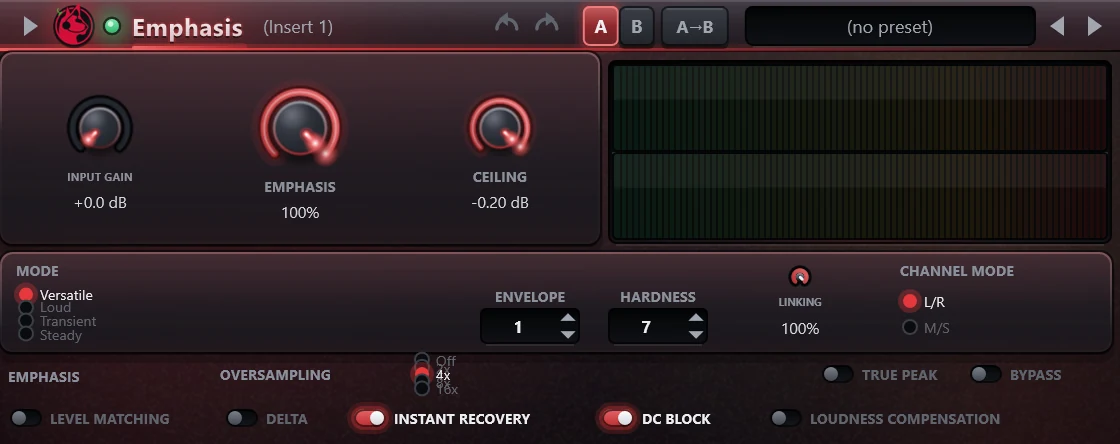
Emphasis is a mastering limiter. The signal passes an input gain, the limiter with its mode, envelope and hardness settings, and a final limiter that holds the output to the ceiling. It loads the settings of the FL Studio Emphasis from an imported .flp project and reports its latency for delay compensation.
Controls
| Control | What it does |
|---|---|
| Input gain | Gain before the limiter, 0 dB to +24 dB. |
| Emphasis | Amount, 0 to 100 percent. It sets the attack shape, release shape and knee amount of the limiter. |
| Ceiling | Highest output level, up to 0 dB. A new instance is at -0.2 dB. |
| Mode | Versatile, Loud, Transient or Steady. |
| Envelope | Order of the envelope, 1 to 4: the number of attack and release stages in series. |
| Hardness | 0 to 9. Each step up halves the limiter's time constant. |
| Linking | 0 to 100 percent. At 100 percent both channels are controlled by the louder one. |
| Channel mode | Processes left and right (L/R) or mid and side (M/S). |
| Oversampling | Off, 2x, 4x, 8x or 16x. |
| True peak | The final limiter detects peaks on a 4 times oversampled signal instead of the sample values. |
| Level matching | Scales the output to the level of the input, by a factor of 2 at most. |
| Delta | Outputs the delayed dry signal minus the processed signal. |
| Instant recovery | Fixes the release time at 5 ms. |
| DC block | A 5 Hz high-pass on the input. |
| Loudness compensation | Changes the meter only, not the audio. |
| Bypass | Crossfades to the dry signal, which keeps the plugin's latency. |
Tips
- Delta plays what the limiter removes.
- Turn on Level matching to compare the processed and bypassed signal at a similar level.