 LYNX SHARE
Pocket Autoduck
Ducks the volume on every beat of the song, with depth, attack, hold, length, shift and six recovery shapes. No sidechain input is needed. Rebuilt from FL Studio Mobile's Autoduck.
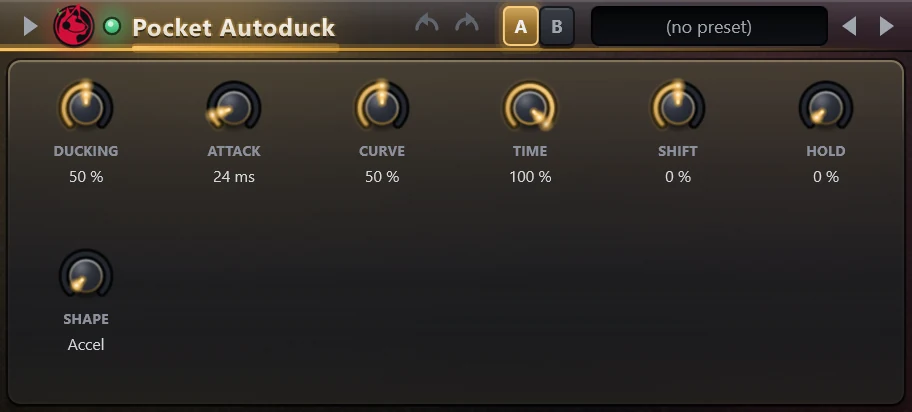
Pocket Autoduck lowers the level at each beat and lets it rise again, which gives a pumping sound like sidechain compression against a kick. It follows the beat of the song, not an audio input. It is the engine that FL Studio Mobile projects (.flm) load their Autoduck module on, and it can also be added to any mixer slot.
Controls
| Control | What it does |
|---|---|
| Ducking | Depth of the level drop, 0 to 100%. At 100% the signal is silent at the lowest point. |
| Attack | Time the level takes to fall, from a very short time up to about half a beat. It is shown in ms at the song tempo. |
| Curve | Bends the fall and the recovery. The value reads Linear at the top of its range. |
| Time | Length of the whole duck as a part of the beat, 0 to 100%. |
| Shift | Moves the duck earlier or later, -50 to +50% of a beat. |
| Hold | How long the level stays down before it recovers, as a part of Time. |
| Shape | Shape of the recovery: Accel, Accel 2, Decel, Decel 2, S-Curve or S-Curve 2. |
Tips
- The duck always repeats once per beat. Other note lengths are not available.
- While the song is stopped, the duck keeps running at the song tempo.