 LYNX SHARE
Transistor Bass
Monophonic bass synth with a step sequencer, distortion, delay and reverb. It plays imported FL Studio Transistor Bass channels and programs.
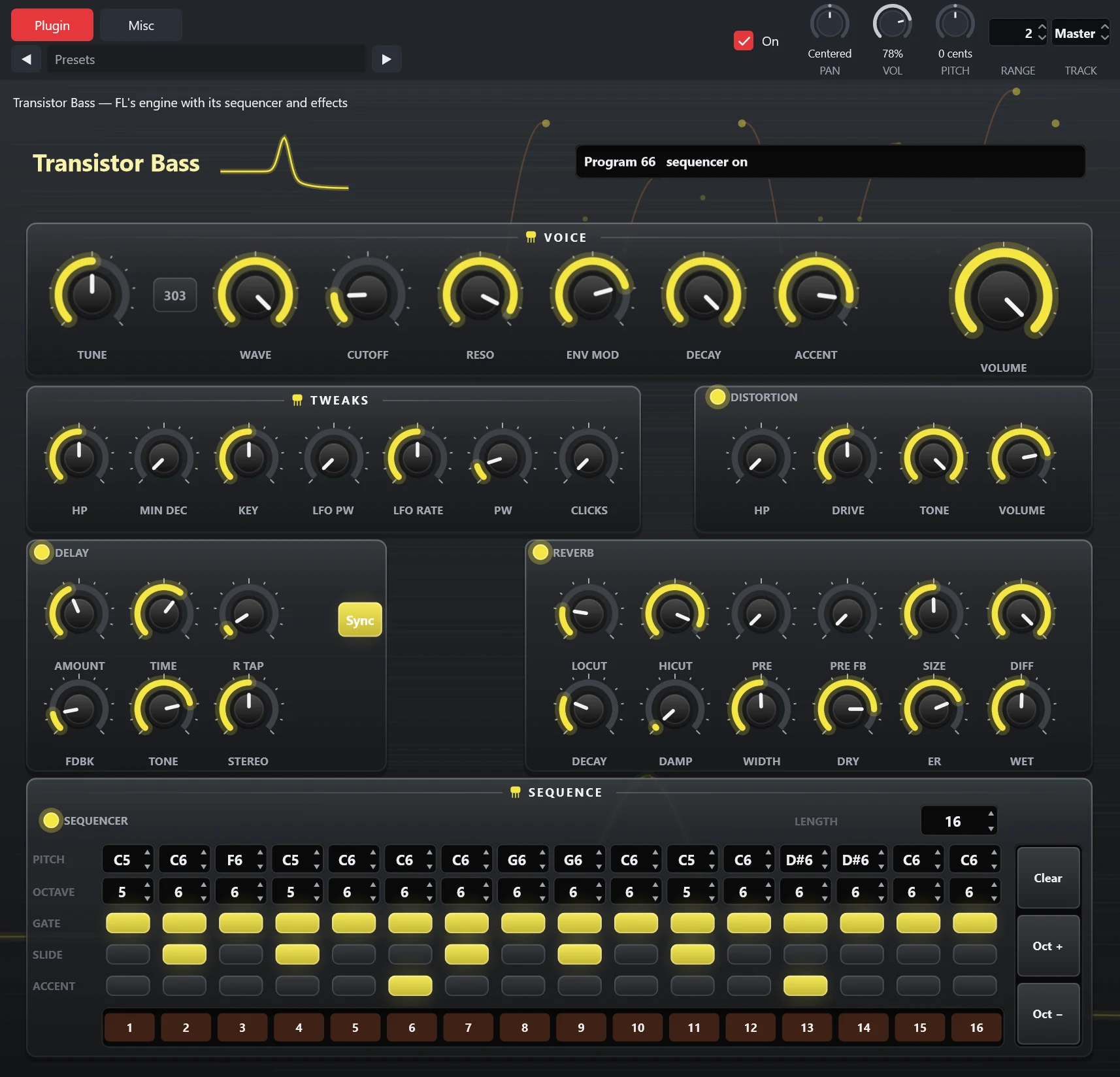
Transistor Bass is a monophonic bass generator built on the engine of the FL plugin of the same name: a saw or square oscillator, a 4-pole low-pass filter with accent and decay envelopes, distortion, stereo delay and reverb, and 128 programs that each hold a patch and a 16-step sequence. The recorded oscillator cycles of the 303 pulse mode are read at run time from the engine DLL in your own FL Studio installation, which must be a supported build, and are not included. When that file is not found the editor shows a notice and the channel stays silent with its settings kept. A new instance starts from the plugin's preset in your own FL Studio installation, so adding one needs FL Studio installed; otherwise the Add menu lists it as requiring FL Studio.
Controls
| Control | What it does |
|---|---|
| Tune, Wave, 303 | Tuning and waveform of the oscillator. The 303 button switches to the recorded pulse cycles. |
| Cutoff, Reso, Env mod, Decay, Accent | Filter cutoff and resonance, how far the envelope moves the cutoff, the envelope decay and the accent amount. Notes with a velocity of 110 or more are accented. |
| Volume | Output volume of the voice. |
| Tweaks | HP (high-pass), Min dec (minimum decay), Key (key follow), LFO PW (LFO amount on the pulse width), LFO rate, PW (pulse width) and Clicks, which the plugin stores as VCA smooth. |
| Distortion | Switch, HP, Drive, Tone and Volume. |
| Delay | Switch, Amount, Time, R tap (right tap), Fdbk, Tone, Stereo and a Sync button for tempo sync. |
| Reverb | Switch, LoCut, HiCut, Pre (predelay), Pre fb (predelay feedback), Size, Diff, Decay, Damp, Width, Dry, ER (early reflections) and Wet. |
| Sequencer | Off: notes play the synth directly and a note played while another is held slides. On: a note selects the program of its key and runs that program's sequence in 16th notes until the key is released. |
| Length | Number of steps the sequence plays. |
| Pitch, Octave, Gate, Slide, Accent | The five rows of the step editor. Per step: its note and octave, whether it sounds, whether it holds into the next step, and whether it is accented. |
Tips
- MIDI volume and pitch bend events and parameter automation are not modelled.
- With the sequencer on, releasing the key stops the sequence.