 LYNX SHARE
Third-party plugins
Plugin formats per system, scanning, the Plugin manager, separate processes and 32-bit plugins.
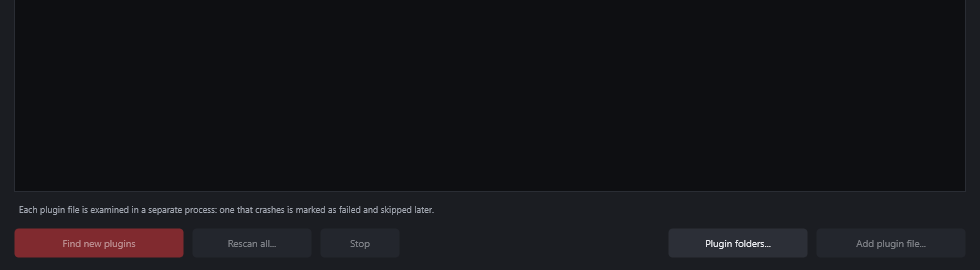
LYNX SHARE hosts instrument and effect plugins from other makers. It finds them by scanning the plugin folders, and Options › Plugin manager... shows what it found. LYNX SHARE's own instruments and effects are described in Built-in instruments and effects.
Scan and add a plugin
- Choose
Options › Scan for plugins. Progress shows in the hint bar and you can keep working. - If the plugin is in a folder of its own, open
Options › Plugin manager..., clickPlugin folders..., add the folder, then clickFind new plugins. - Press
F8for the plugin picker and type part of the plugin's name. - Double-click it or press
Enter. An instrument becomes a new channel. An effect goes into the selected Mixer insert.
On first start, the setup wizard lists the plugin folders and scans them in the background. Options › Setup wizard (language, audio, plugin folders)... opens it again. LYNX SHARE also looks for new plugins a few seconds after each start.
Formats per system
| System | Formats hosted |
|---|---|
| Windows | VST3, CLAP, VST2 |
| macOS | VST3, CLAP, Audio Units |
| Linux | VST3, CLAP, LV2, VST2 |
VST2 is not hosted on macOS. On Linux, Windows plugins work through yabridge and Wine, which you install yourself: add the folder yabridge syncs to as a plugin folder.
The Plugin manager
| Control | What it does |
|---|---|
| Search box | Filters by name, vendor, format or file |
All, Instruments, Effects, Favourites, Failed | Choose which plugins are listed |
| Star column | Marks a favourite |
Bits column | 32, 64 or 32+64 (Windows) |
Status column | OK, File not found or Failed to load |
Find new plugins | Scans for files that are not in the list yet |
Rescan all... | Forgets the failed files and examines every file again |
Plugin folders... | Edits the folders that are scanned |
Add plugin file... | Adds one plugin file |
Each plugin file is examined in a separate process. A file that crashes or hangs for 30 seconds is marked as failed and skipped later. On Windows the failed files are listed with the reason in %APPDATA%\LYNX\scan-failures.log.
The standard folders are scanned, plus the ones you add:
- Windows:
Common Files\VST3,Common Files\CLAP,Common Files\VST2,VSTPluginsandSteinberg\VSTPluginsunder Program Files, and the folders FL Studio uses if it is installed. - macOS:
VST3,ComponentsandCLAPin~/Library/Audio/Plug-Insand/Library/Audio/Plug-Ins. - Linux:
~/.vst3,~/.clap,~/.lv2,~/.vstand the same folders under/usr/liband/usr/local/lib.
Docked and detached plugin windows
A plugin's editor opens inside the main window, like the other panels. Detached in the plugin window's menu gives that plugin a window of its own, and Pin on top in the same menu keeps a detached window above LYNX SHARE's other windows.
Detach all new plugins in Options › General settings... opens every plugin you add detached. Tools › Switch all plugin editors to sets Attached or Detached for all plugins of the project.
Run plugins in a separate process
By default a plugin runs inside LYNX SHARE, so a plugin that crashes can take the program down. As an option, each plugin runs in its own process.
- Open
Options › General settings.... - Turn on
Run plugins in a separate process (protects LYNX SHARE from crashes). - Reopen the project to apply it to plugins that are already open.
If such a plugin crashes or stops answering, it is muted, a message appears and LYNX SHARE keeps running. Reload in that message starts the plugin again with the settings from the last save or backup, without reopening the project. The plugin's editor opens in its own window and cannot be docked or pinned.
To do this for one plugin only, use Run in a separate process or Always run <plugin> in a separate process in the plugin window's wrapper menu. When a plugin's editor crashes, the message that appears offers the second one too.
This works on Windows and Linux, and since 0.1.25 on macOS.
A plugin that crashes inside LYNX SHARE is switched off, and its message offers Reload too. Later, use Reload crashed plugin in the channel's menu or the effect slot's menu.
32-bit plugins (Windows only)
On Windows, 32-bit VST2 and VST3 plugins run through a bridge (LYNX-bridge32.exe). The bridge adds no latency. A plugin that crashes in it stops on its own while LYNX SHARE keeps playing. A bridged plugin's editor opens in its own window and cannot be docked or pinned. When both a 32-bit and a 64-bit build of a plugin are installed, Bit size in the plugin window's Wrapper settings chooses which one loads.
Plugin performance monitor
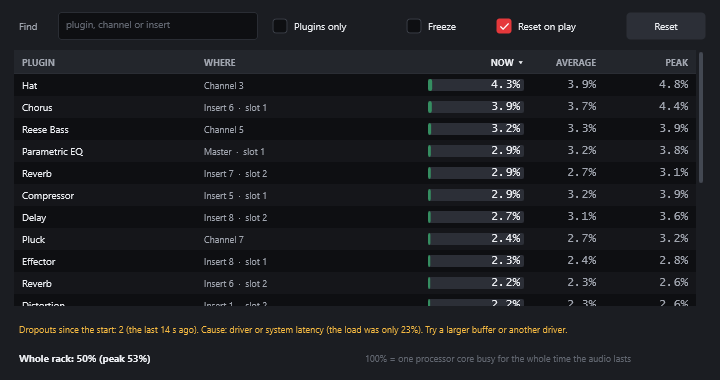
Tools › Plugin performance monitor... lists every instrument and effect with the processing time it takes: now, on average and at its peak. 100% means one processor core busy for the whole time the audio lasts.
| Setting | What it does |
|---|---|
Find | Filters by plugin, channel or insert |
Plugins only | Hides LYNX SHARE's own instruments and effects |
Freeze | Stops updating the numbers |
Reset on play | Starts averages and peaks again each time playback starts |
Reset | Clears averages and peaks now |
Send an instrument's outputs to separate inserts
An instrument plugin with several outputs can play each one on its own Mixer insert. In the plugin's window, click Wrapper settings, then the Processing tab. Under Connections, each output has a light that turns it on or off and a number: how many inserts after the channel's own insert it plays on. Auto map outputs gives each output the next insert, and Reset goes back to the defaults.
FL Studio's own plugins
FL Studio's native plugins, such as Sytrus, Harmor and Patcher, run only inside FL Studio. To use them in LYNX SHARE, use the plugin version of FL Studio that comes with it. On Windows it is installed as FL Studio VSTi and FL Studio VSTi (Multi) in C:\Program Files\Common Files\VST2. On macOS it is an Audio Unit.
- Scan for plugins. Both appear as instruments with the vendor Image-Line. The first scan can take a while, because the whole of FL Studio starts inside the plugin.
- Add
FL Studio VSTito a channel and open its window. Click the FL Studio logo to open FL Studio's own window, with its Channel rack, Mixer and browser. - In FL Studio's Channel rack, add an instrument. A new FL Studio plugin starts with one empty Sampler and makes no sound until you add one. Notes from LYNX SHARE play the channel selected in FL Studio's Channel rack.
- FL Studio's own patterns play when LYNX SHARE plays, at LYNX SHARE's tempo.
What you build inside FL Studio is saved with the LYNX SHARE project. FL Studio VSTi (Multi) has 16 stereo outputs, which can play on separate inserts (see the section above). Your FL Studio licence decides which FL plugins work inside it. LYNX SHARE does not load FL Studio's plugin files by itself.
If the FL Studio plugin is listed as Failed to load, right-click it in Options › Plugin manager... and choose Try again (scan this file now).
The Plugin database folder
The folders of the Browser's Plugin database, the plugin picker and the plugin menus are a folder on disk: LYNX/Plugin database in your Documents folder. To open it, right-click Plugin database in the Browser and choose Open.
EffectsandGeneratorshold one.lynxpluginfile per plugin. Make folders and subfolders (up to 4 levels) and move the files into them.- Rename a file to rename the plugin in the menus. Delete a file to take the plugin out of the menus. It is not uninstalled.
Installedhas an entry for every plugin. Copy one intoEffectsorGeneratorsto bring a plugin back.
Open a project without its plugins
File › Open without third-party plugins... opens a LYNX SHARE project with every third-party plugin switched off, for a project that will not open or crashes while it loads. The plugins' saved settings are kept. File › Switch plugins back on... turns them on again.
When a plugin is not installed
LYNX SHARE first looks for the same plugin by its identifier, then by file, then by name. A project saved with the VST2 opens with the VST3 of the same product and the other way round, but then the plugin plays with its default settings.
If an effect is not installed at all, a LYNX SHARE effect with the same role takes its slot and the original stays in the project. Where the plugin's saved settings can be read, the stand-in starts with matching settings. The switch is Substitute missing plugins with LYNX SHARE equivalents in Options › General settings.... See Built-in instruments and effects. Help › Missing files... lists the plugins that were replaced.
Good to know
- A hosted plugin's window has a preset bar: the plugin's own programs, your presets,
Save preset...,Load preset file...andExport preset file.....fxp,.fxband.vstpresetfiles only load into a plugin that runs inside LYNX SHARE, not in a separate process. - The monitor measures only while its window is open.
- While a plugin's window has focus, a key the plugin does not use plays the typing keyboard piano. On Windows, with the keyboard button in the window's header off, LYNX SHARE handles keys before the plugin, shortcuts included.
- A VST3 plugin's own parameter menu starts with LYNX SHARE's items, such as
Create automation clip. See Automation. MPEunderMIDIin a plugin'sWrapper settingssends each note on its own MIDI channel. See MIDI controllers.- Missing instruments are not substituted yet. A missing instrument plugin becomes a built-in synth chosen by the channel name.