 LYNX SHARE
Coming from BandLab, FL Studio Mobile or GarageBand
The Simple layout for people who make music on a phone, a tablet or in the browser: what is the same, what maps to what, and opening your projects.
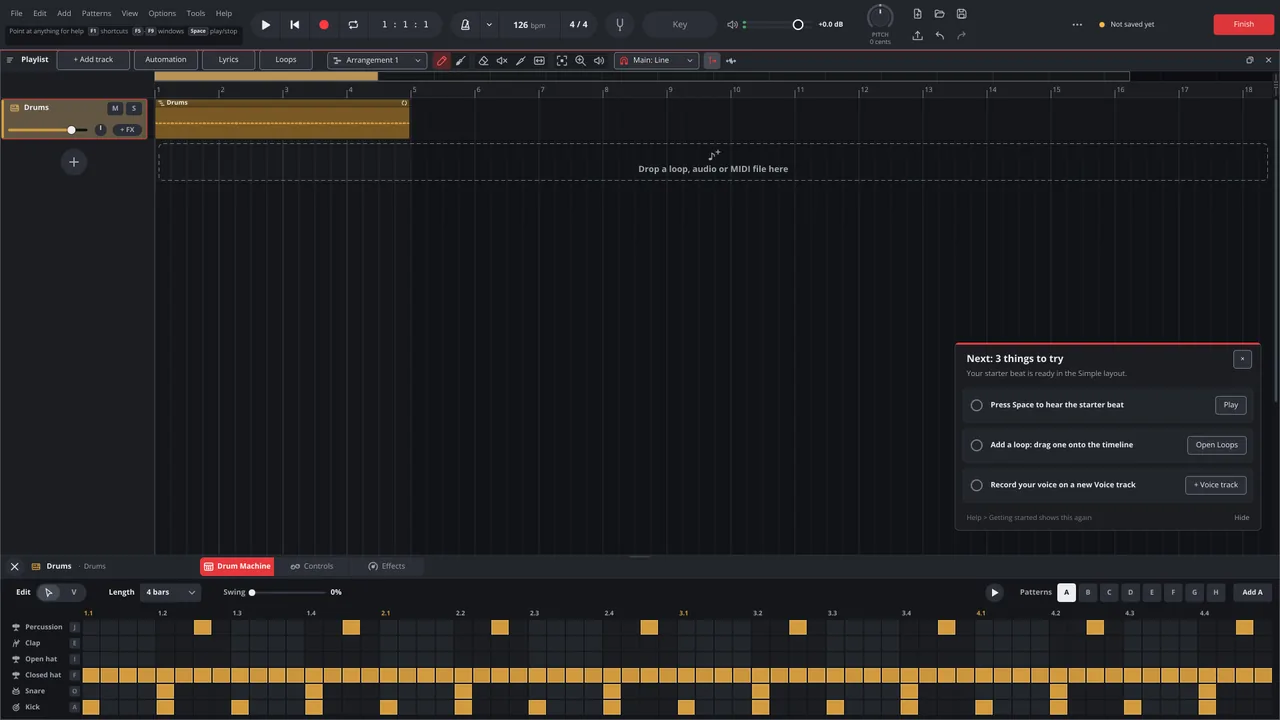
Pick the Simple layout. It is one window with your tracks on a timeline, loops, a drum machine and quick recording, the way BandLab, FL Studio Mobile and GarageBand work. The other two layouts stay one click away.
Your first three things
- Pick the layout. The first time LYNX SHARE starts, a welcome card asks where you are coming from. Click
BandLab, FL Studio Mobile or GarageBand: the window switches to the Simple layout with a starter beat on a Drums track. Later,View › Layout style › Simple layoutswitches to it at any time. - Make a beat. Click the squares of the Drum Machine under the timeline. See Make a beat in the Simple layout.
- Add a loop and your voice.
Loopsopens the loop panel: drag a loop onto the timeline. Then record your voice on a Voice track.
What is the same
- Tracks on a timeline, one per voice or instrument, each with volume, pan, mute, solo and effects.
- A drum machine with a step grid, loops that follow the song's tempo and key, and recording on a voice track.
- One-knob effects, and a finished sound for the whole song before you save it.
- Making music with friends: an online session puts up to 4 people in one project.
What is different
- LYNX SHARE is a desktop program for Windows, macOS and Linux. It does not run in a browser or on a phone.
- Your projects are
.lynxfiles on your computer. There is no account and no cloud: save, back up and send them like any other file. - Third-party plugins load (VST3 and CLAP, Audio Units on macOS, LV2 on Linux, VST2 on Windows and Linux), next to LYNX SHARE's own instruments and effects.
- When you want more, the Pattern layout (FL Studio's way of working, with the Channel rack and the Piano roll) and the Mixer (
F9) work on the same project.
What maps to what
| In those apps | In LYNX SHARE's Simple layout |
|---|---|
| The track view or Mix Editor | The timeline: one track per voice or instrument |
| Adding a track | + Add track: Voice / audio, Instrument, Drums, Sampler, Guitar / bass, Import, Loops |
| A drum machine or step sequencer | A Drums track's Drum Machine tab: a step grid, patterns A to H, length and swing |
| Drum pads | A Sampler track's 16 pads, played with the computer keys |
| A loop library | Loops: drag a loop onto the timeline. It follows the project's tempo and key |
| Piano roll | The dock's Editor tab, or Open in the Piano roll for every tool |
| On-screen keyboard and chords | The dock's Keyboard tab: piano, Scale keys or the Chord pad |
| Track effects and presets | The dock's Effects tab: one-knob effects, ready chains under Preset, and Blend |
| Pitch correction for vocals | LYNX Tune, a pitch corrector with key and scale (+ in the dock, then More effects...) |
| Mastering | Finish: a finished sound for the whole song, then save it as WAV or MP3 |
| Lyrics | Lyrics |
| Tuner | Tuner in the toolbar |
| Mixer | F9 |
| Song parts (intro, verse, chorus) | Sections in the title bar: parts that move, copy and repeat as a whole |
| Ducking the beat under the vocal, an echo send | Duck under and the Echo knob, next to Reverb in the dock's Effects tab |
Your projects
- FL Studio Mobile (
.flm):File › Open...opens it. The import is partial: tempo, tracks, patterns, audio clips, drum kits, the DW Sampler, the Slicer, MiniSynth, Transistor Bass, 3x Osc, GMSynth, SuperSaw and FLM's effects come over. Other FLM instruments play LYNX SHARE's built-in synth.File › Save a copy as FL Studio Mobile project (.flm)...writes a copy back for FL Studio Mobile. - GarageBand (
.band, from GarageBand 10 or GarageBand for iOS):File › Open...opens it as Simple-layout tracks with their regions, tempo, key and mix. Instrument tracks play LYNX SHARE's built-in synth and drums, because GarageBand does not store their sounds in a form other programs can read. - BandLab (
.blx, a project downloaded by Cakewalk or Sonar):File › Open...opens it as Simple-layout tracks with regions, tempo, key, the mix, volume and pan automation and the common effects. BandLab's instrument sounds and other effects are listed in the import report. - Stems from any app: export the tracks as audio or MIDI files, put them in one folder, then click
+ Add track, andFolder...besideImport. Each file becomes a track that starts at the beginning.
Help › Last project import report lists what was approximated or left out. See File formats.
Good to know
File › Savewrites a.lynxfile. The file you opened is never changed.Finishsaves the song as WAV or MP3, andFile › Exporthas more formats and stems. See Exporting.Help › First-song tourwalks you through a first song in about five minutes.
BandLab is a trademark of BandLab Technologies. FL Studio Mobile is a trademark of Image-Line Software. GarageBand is a trademark of Apple Inc. LYNX SHARE is an independent program, not affiliated with or endorsed by them.